HollaEx® v2.17, code name Muscat, is here. This release focuses on three big themes for exchange operators, smarter account structures for teams, more flexibility when pricing assets and more tools to improve day-to-day operations of your crypto platform.
Below are a few of the Muscat's bullets:
Sub accounts for segregated risk and shared usage
Shared accounts for high-trust collaboration
Advanced formula pricing for Broker OTC
Batch coin/asset addition from Operator Controls
Limit order support in the Convert (Quick Trade) interface
Force 2FA on all users for withdrawals
Auto/manual deposit & withdrawal review flows for admins
New features: Force 2FA and auto/manual deposit & withdrawal review flows for admins
Click here to see the official summary on our docs. For a deeper, long-form breakdown with software screenshots 👇 continue on below.
Advanced Formula for Broker OTC Pricing
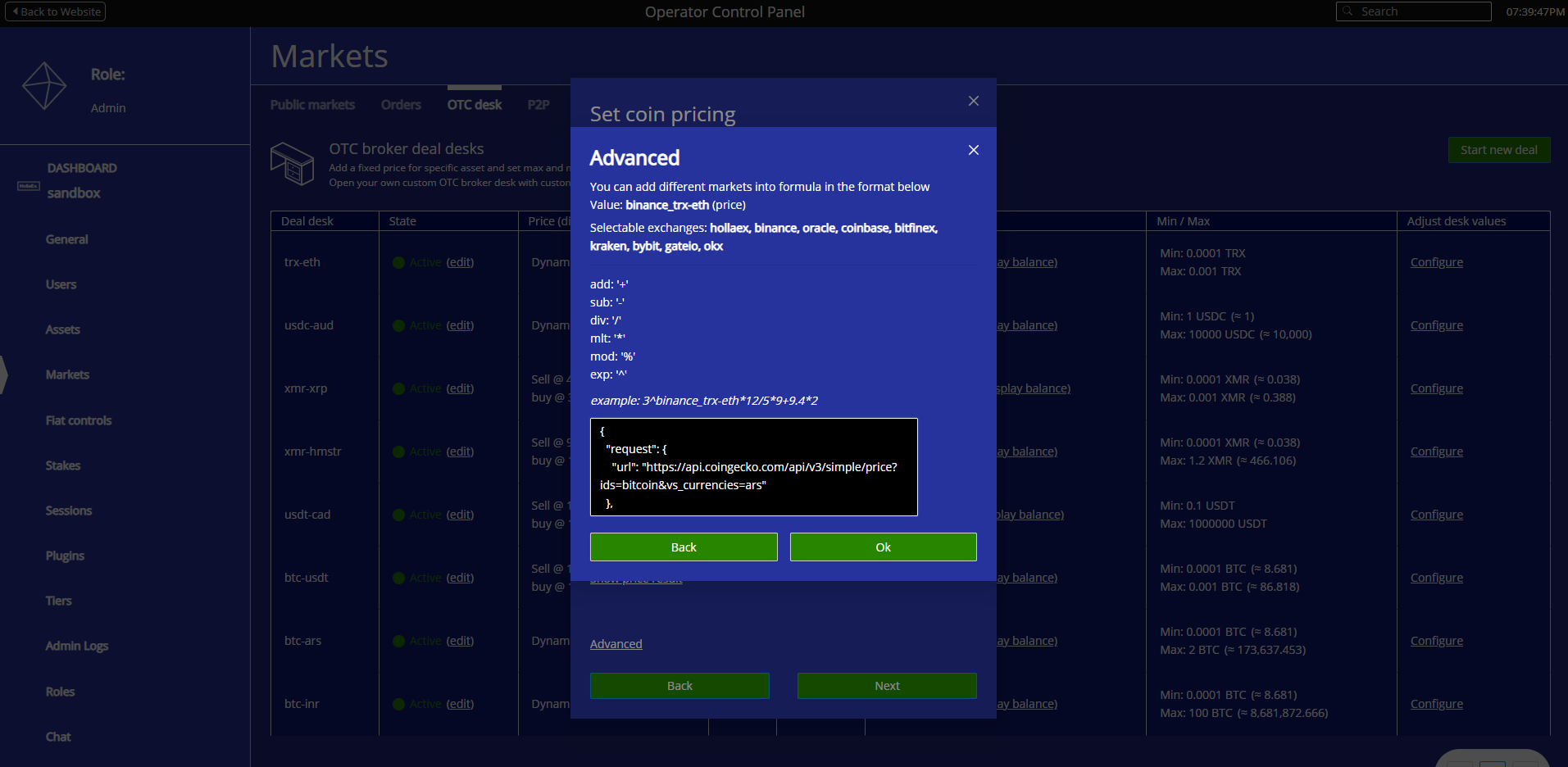
Muscat introduces an OTC JSONPath price sourcing method that gives admins much finer control over how OTC prices are sourced and calculated.
Previously, OTC pricing typically relied on a preset source of exchange prices. With Muscat, admins are no longer locked into a single list of exchange price feeds.
With v2.17:
Admins can configure different price sources for their broker OTC desk.
Admins can input price sources from data providers such as CoinGecko or CoinMarketCap.
You can define custom formulas that blend multiple feeds, apply spreads, and include extra markups or discounts.
Pricing logic can be aligned with your business model (e.g., premium retail spreads vs. tighter institutional quotes for VIPs).
In practice, this means you can:
Offer tighter quotes to institutional partners while keeping wider spreads on the retail side.
Weight certain feeds more than others or add fallbacks.
Protect your margins in volatile conditions by embedding spreads and buffers directly into your OTC pricing logic.
Code above displayed in full below.
Example Advanced Formula code for BTC/ARS price source from CoinGecko:
This makes it easier to run a professional brokerage service on top of your exchange while maintaining consistent and predictable margins.
Sub Accounts: Segregate Risk and Share Access Safely
Muscat introduces sub accounts so operators and their users can segment risk and share access in a controlled way.
At a high level, sub accounts let one main account split its activity and balances into multiple, clearly separated buckets. Each bucket can have its own purpose, permissions, and (if you choose) its own user.
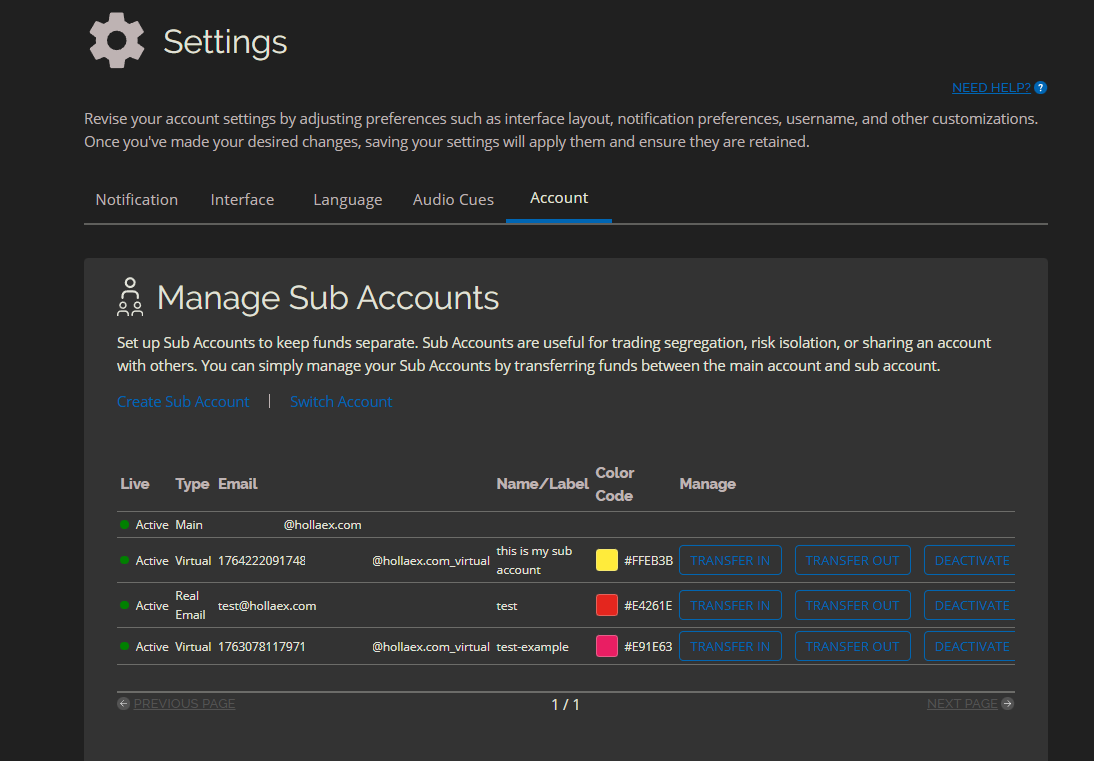
Screenshot example of the managing sub accounts page
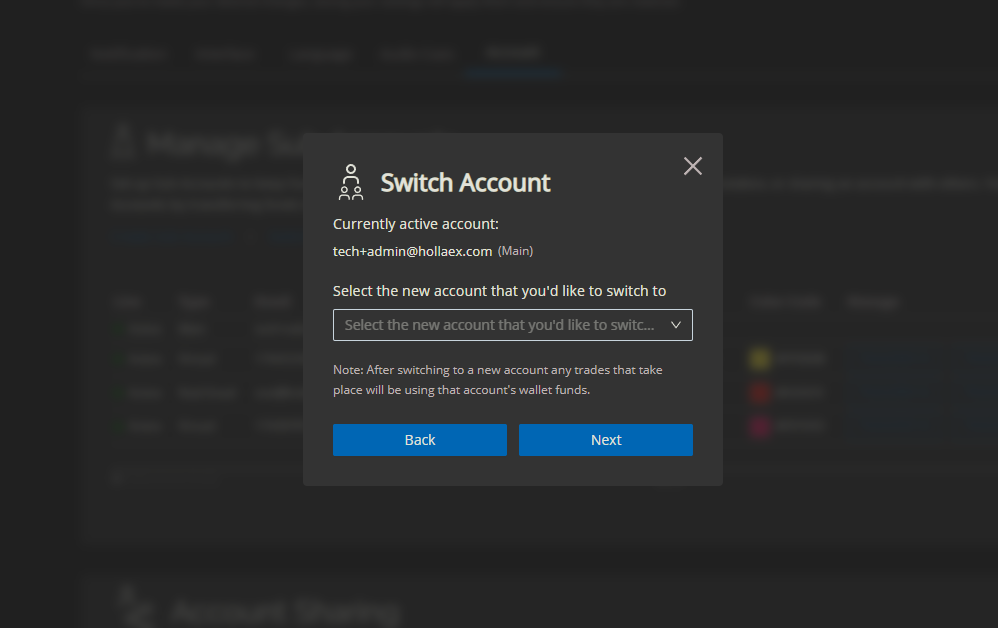
Switch account screenshot example
With sub accounts:
A main account can create additional child accounts under the same owner.
A main account can transfer funds in and out of the sub child accounts at anytime.
User of the sub child accounts can't withdraw from the account (only Main account can 'transfer funds out')
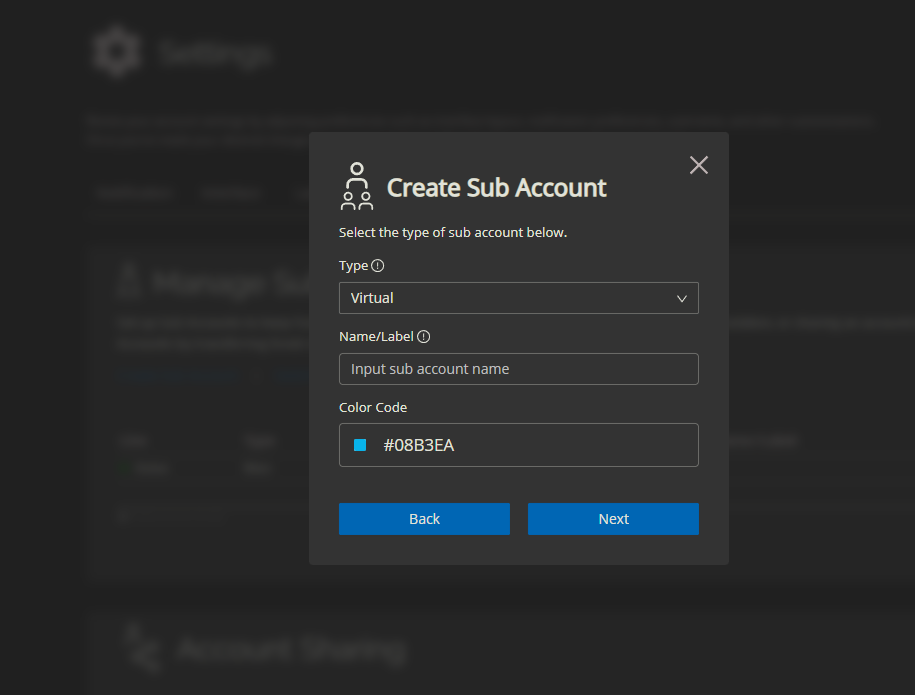
Each child account can be either a Virtual sub account or a Real Email sub account.
Each sub account can be used for separate strategies or business lines (e.g., treasury, trading desk, client funds, internal testing, future margin trading).
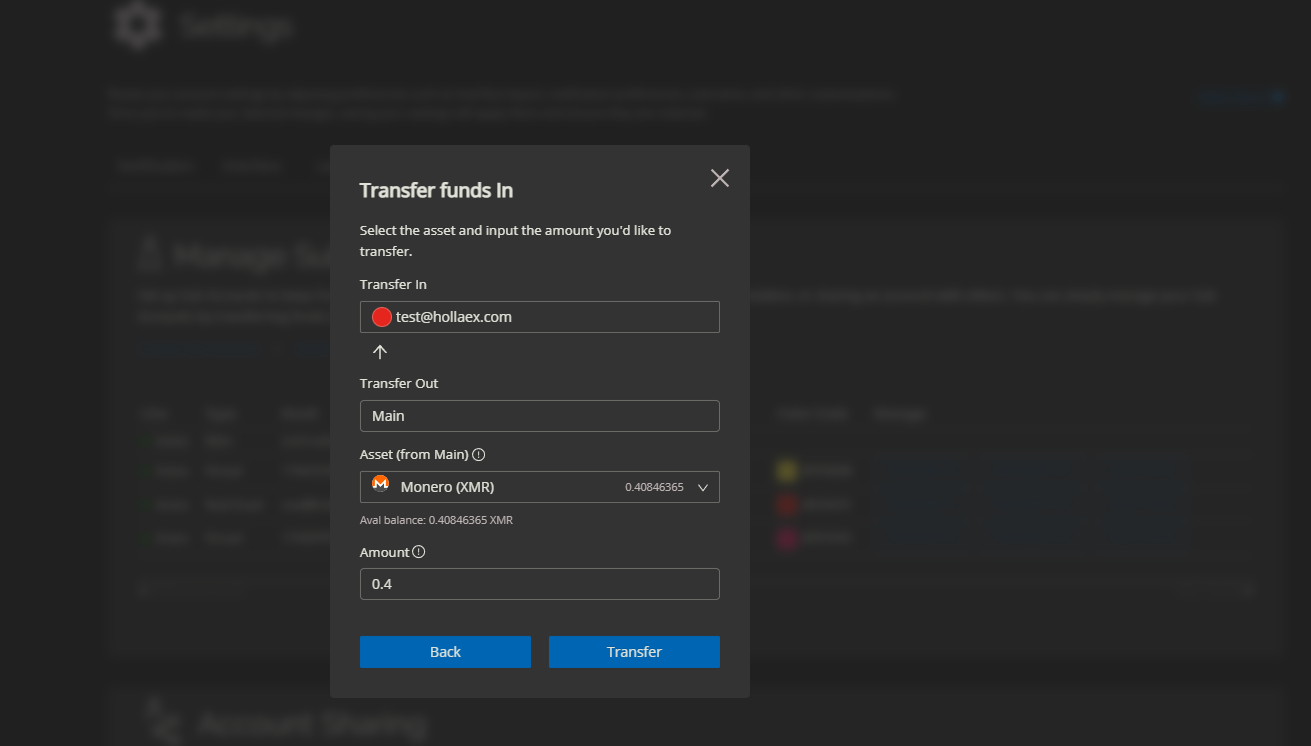
Main Account using the Transfer Funds In functions
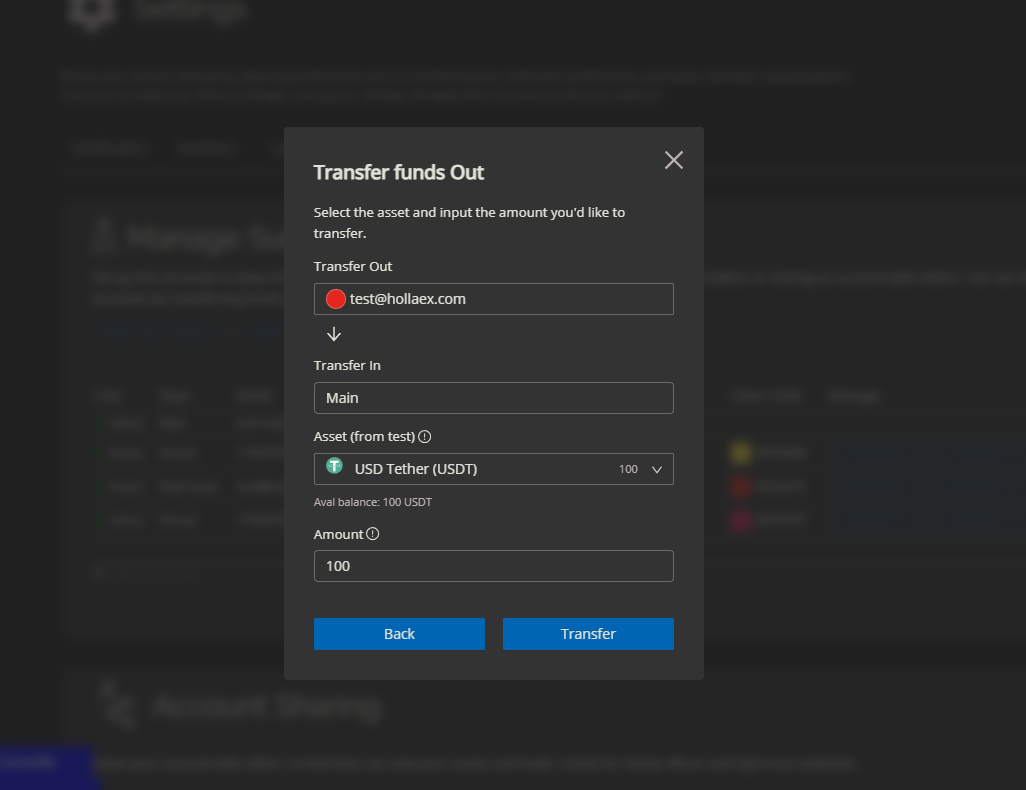
Main Account using the Transfer Funds Out functions
Real Email sub accounts
A Real Email sub account is tied to another person's email address:
If that email is not yet on the platform, they receive an email to confirm the sub account.
Real Email sub accounts cannot withdraw, but they can deposit, trade, and use almost every other standard function.
In order to withdraw funds of the sub account, the main account holder must use the 'Transfer Out' functions within the Sub Account page while using the Main Account
The invited person logs in normally with their email and password and then uses the sub account assigned to them.
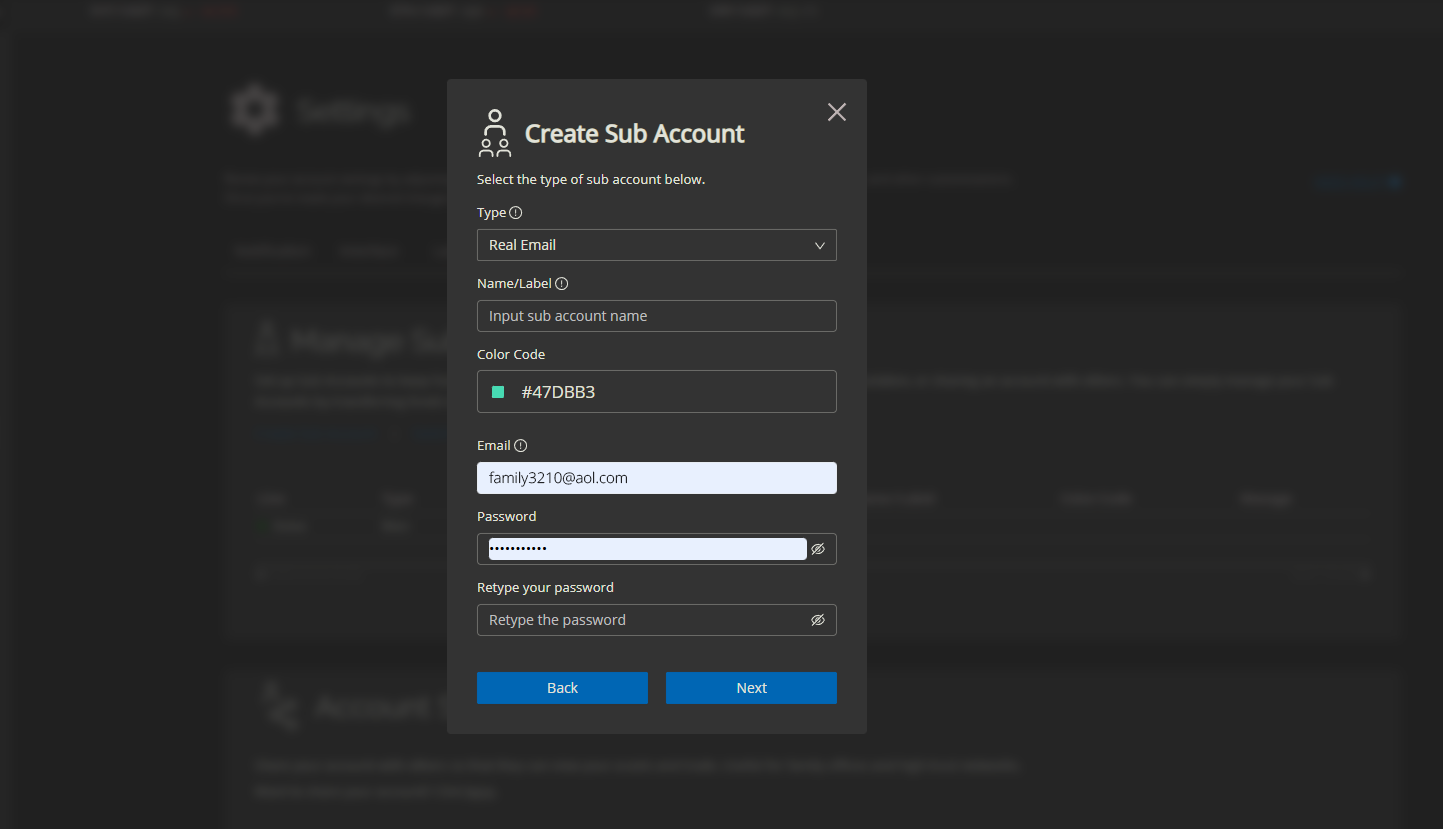
Real Email Sub Account setup example sharing with family member personal email address
Real Email sub accounts are ideal when you want to give someone useful, day-to-day access without handing over the keys to everything.
Virtual sub accounts
A Virtual sub account is not shared with any external email. It is used by the main account holder as an internal segregated wallet, often for higher-risk or experimental trading strategies.
Typical uses include:
Running a higher-risk trading strategy in its own pocket of funds
Testing new markets or bots without touching the main balance
Also can't be withdrawn from directly (Main Account must use 'Transfer Out' functions)
Preparing for features like future margin trading in a clean, isolated environment
Virtual sub account setup
Example use cases
Sub accounts open up a lot of practical patterns:
A corporate exchange client gives a trader access to a single Real Email sub account only, so the trader can work without touching treasury.
An exchange team separates operational funds from fee revenues or marketing allocations, each in its own sub account.
Higher-risk strategies live in dedicated Virtual sub accounts, so they don’t impact the rest of the balance.
Friends-and-family accounts are created with tightly scoped permissions and no withdrawal capability.
Sub accounts give structure to what is otherwise just “one big wallet”, while still keeping the experience simple for the main account holder.
Shared Accounts: Collaborate with Trusted Partners
Where sub accounts are great for segmentation and limited-access scenarios, shared accounts are designed for high-trust collaboration.
Shared accounts let multiple people operate out of the same main account, with clear rules for who can do what.
With shared accounts:
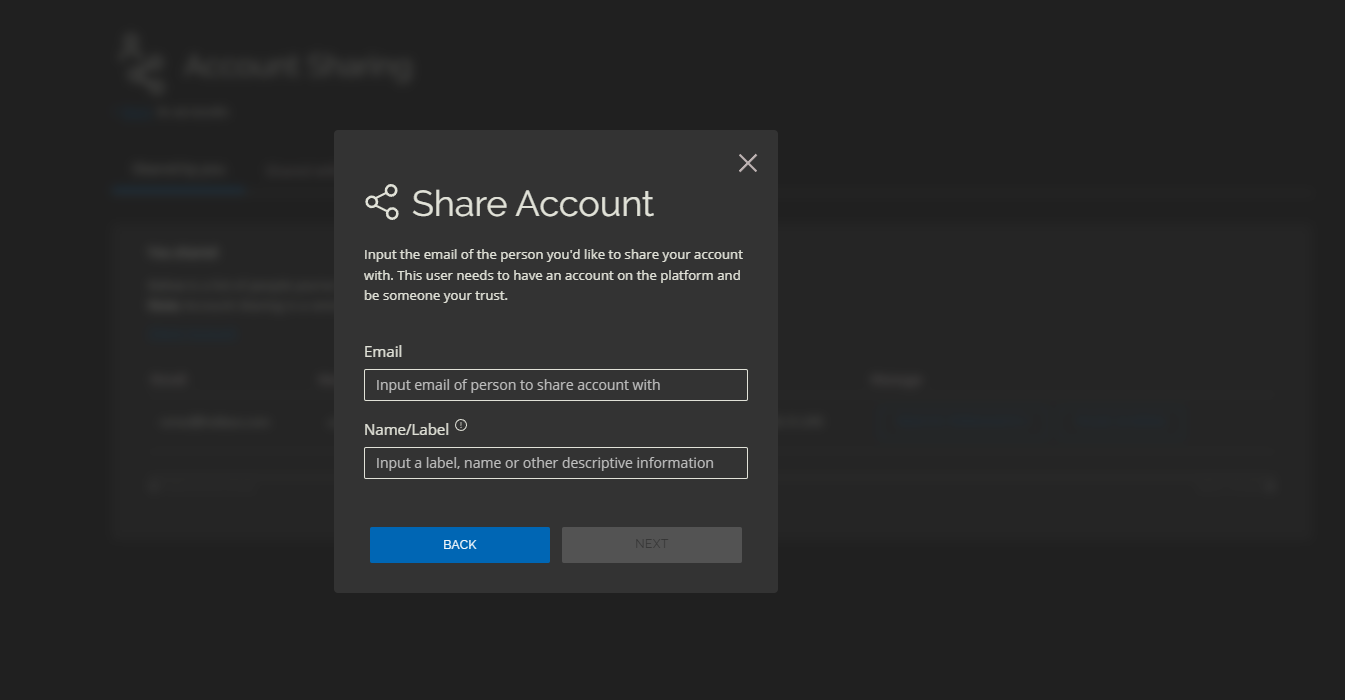
An account holder can share their main account with a trusted person or group.
Shared users can see the balance and trade from the main account as if it were their own, subject to the permissions you set.
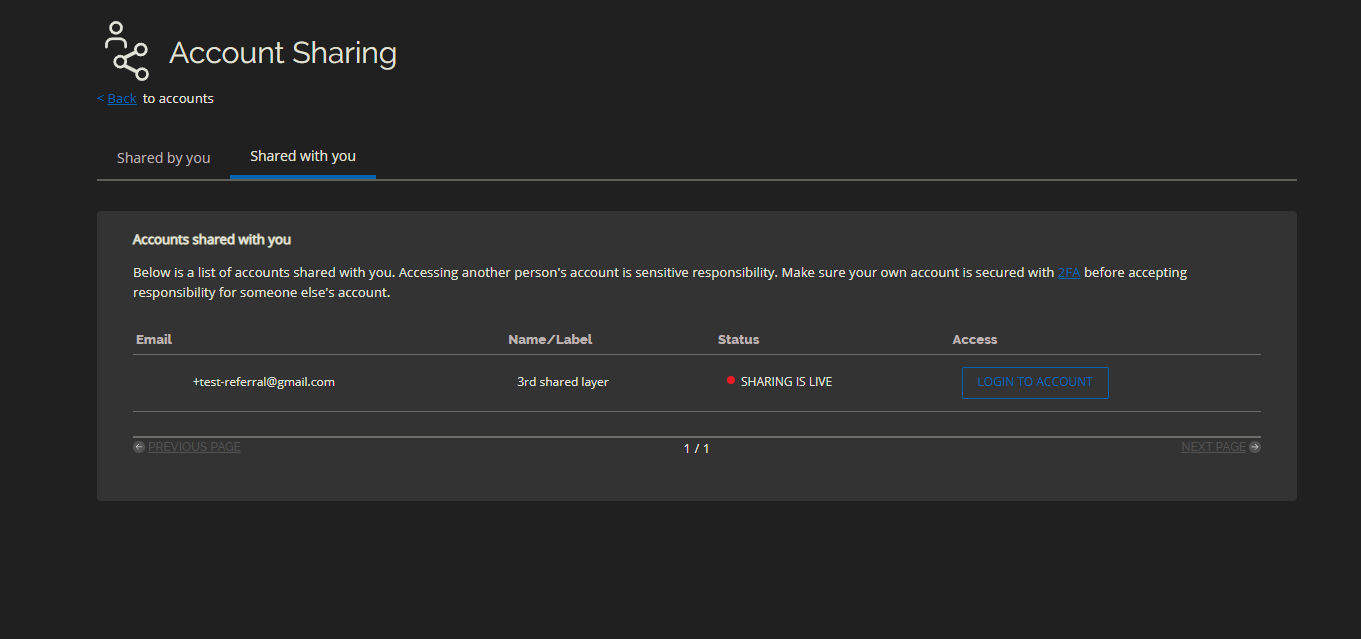
To access a shared account, the invited user logs in, goes to Shared Account, and opens the Shared with you tab.
You can only share your account with someone who already has an account on the platform.
The invited party can access almost the entire account, making this ideal for co-founders, finance managers, senior traders at a family office, and other high-trust business networks.
Withdrawals can be initiated by shared users, but the original main account holder still needs to confirm them.
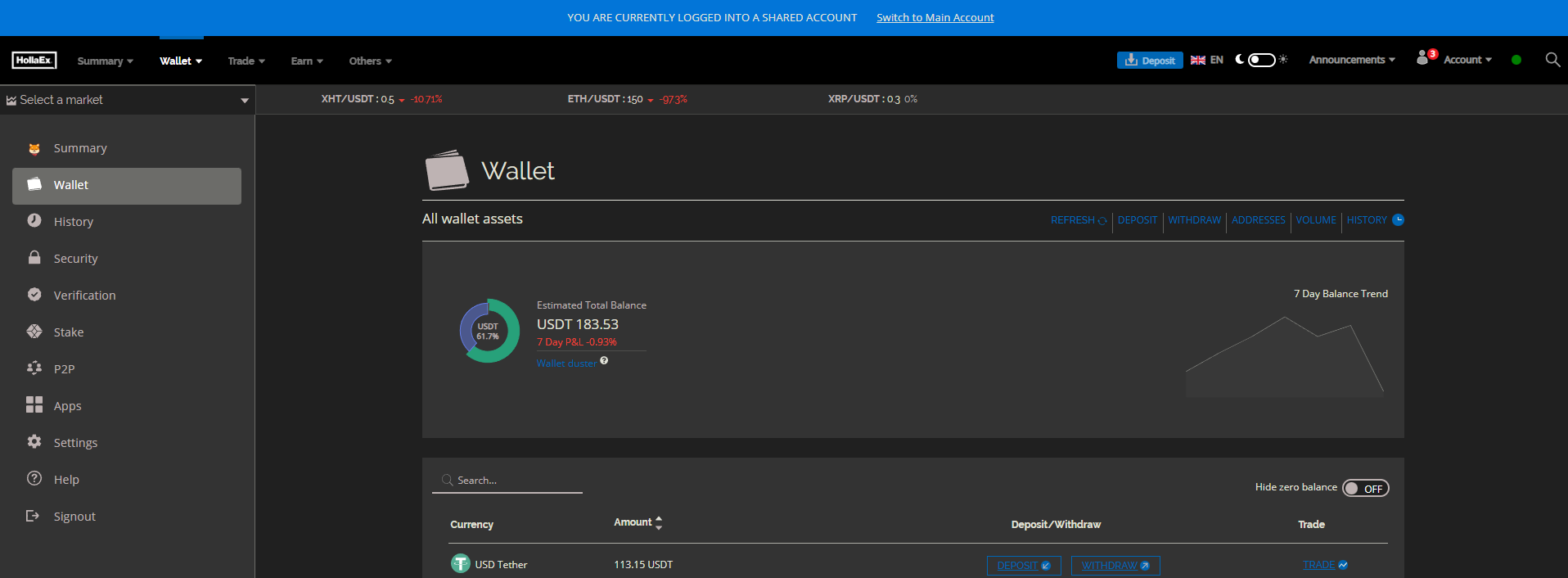
Blue bar at top indicating user is in a shared accout
Shared with you tab
Sharing account setup
Shared by you tab
In practice, this lets you delegate daily operations while keeping ultimate ownership and top-level oversight clearly defined with the original account holder.
Think of shared accounts as a way for serious business users to run their exchange account like a team workspace instead of a single-user login.
Example use case: market making together
A common use case for Shared Account is market making:
You create a dedicated market-making account on your exchange.
You then share that account with other team members in your high-trust business network.
Those team members can monitor, adjust, and act on market-making activity while keeping everything in one place.
This keeps sensitive operations centralized, while still letting multiple people work together on the same strategy.
Fee Calculations for Any Period
Muscat also makes fee reporting much more flexible on the exchange admin Operator Controls.
Admins can now:
Select a specific period (e.g., day, week, month, quarter, custom date range).
Instantly see fee totals and calculations for that exact period.
This is particularly useful for:
Revenue reporting and accounting.
Comparing fee performance week-over-week or month-over-month.
Checking the impact of a new fee structure, market campaign, or promotion.
No more asking “How much did we earn in fees today?” and then tediously exporting CSVs and spreadsheets to find the answer. The numbers are visible directly in the Operator Controls, ready whenever you need them.
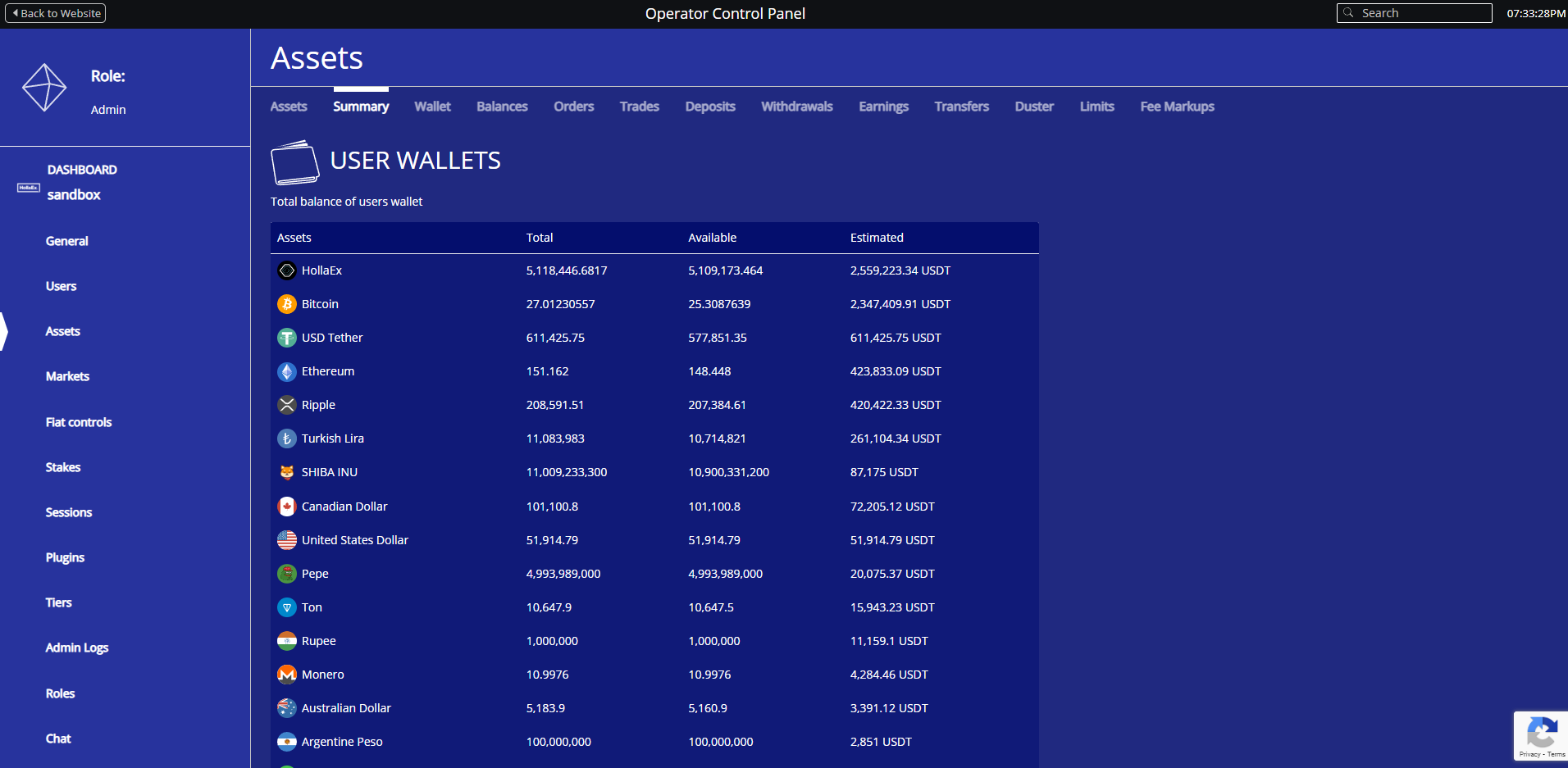
Total Balances for All Users
Simply update but with big effect is the summary of all coin balances of all the users, now visible on the Asset > Summary page of your Operator Controls.
Limit Orders in the Convert (Quick Trade) Interface
The Convert / Quick Trade interface has historically focused on simplicity with a market-style experience. Muscat adds a new twist:
Users can now place a Limit Order type directly from the simple Convert interface.
This means they can set their own prices and then wait to buy lower or sell higher while still using the familiar Quick Trade flow.
In practice:
Users who love the simplicity of Quick Trade can still control the exact price they want to buy or sell at.
Advanced traders can use Convert for fast, clean order entry without sacrificing pricing control.
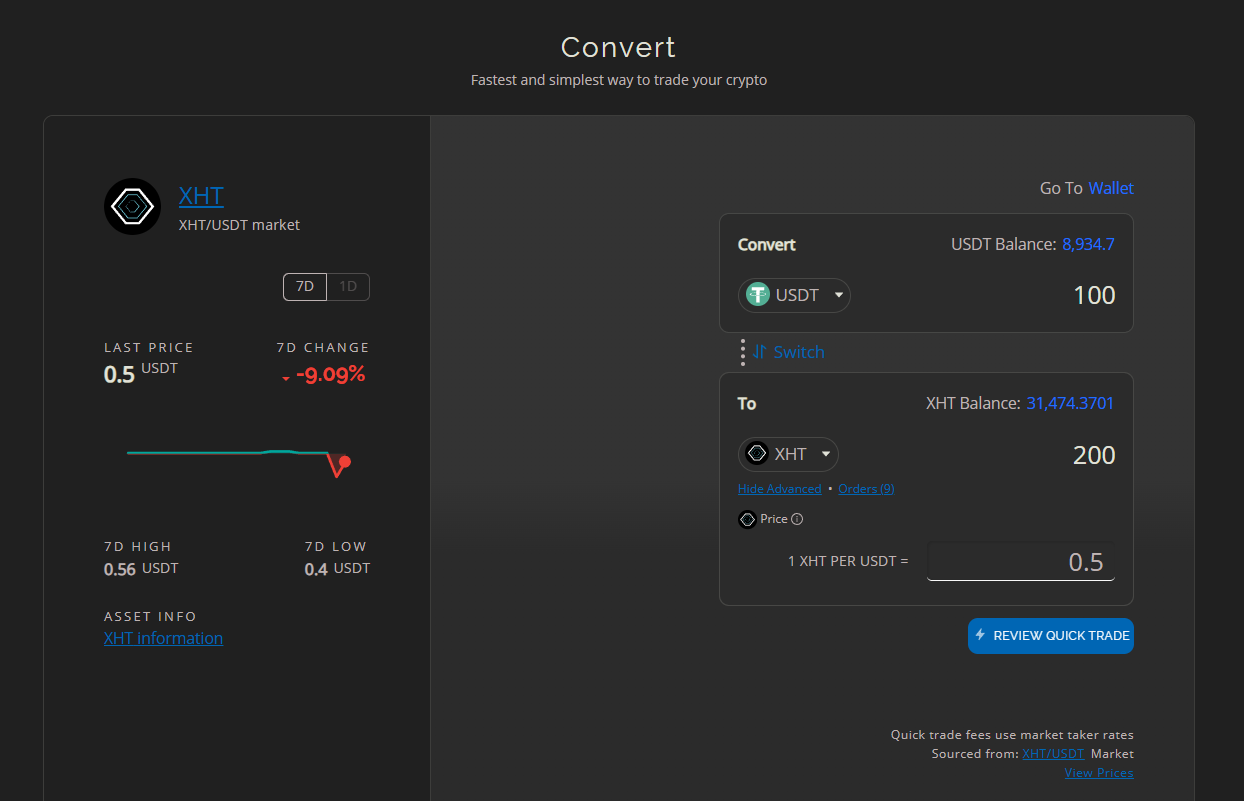
Limit order added to major trading pairs within the Quick Trade Convert, under 'Advanced', allowing users to input preferred price.
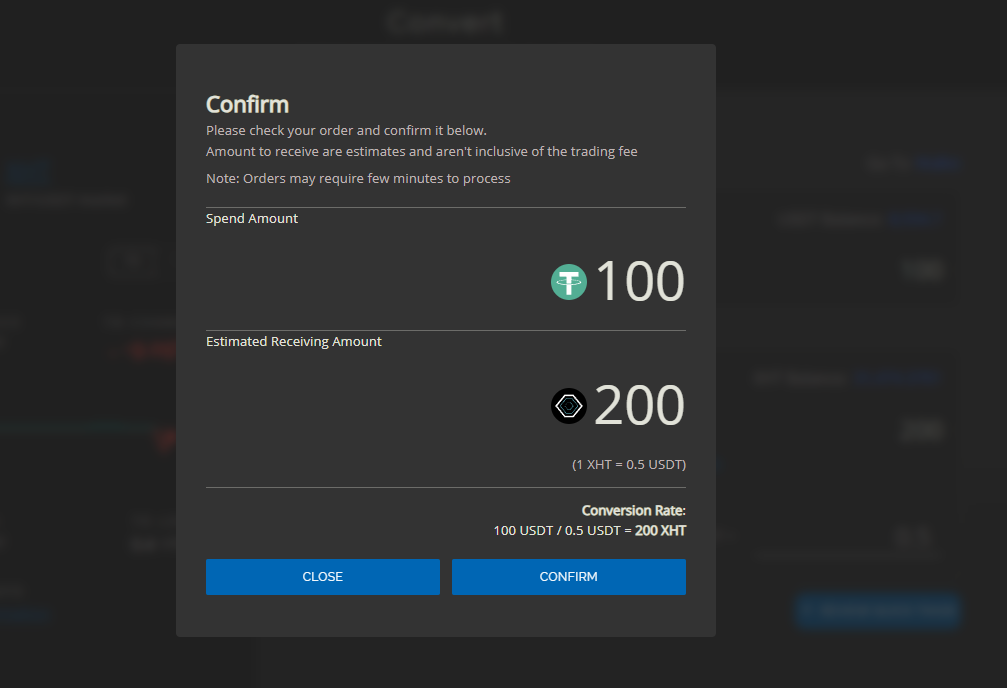
Confirmation of limit order using Quick Trade Convert
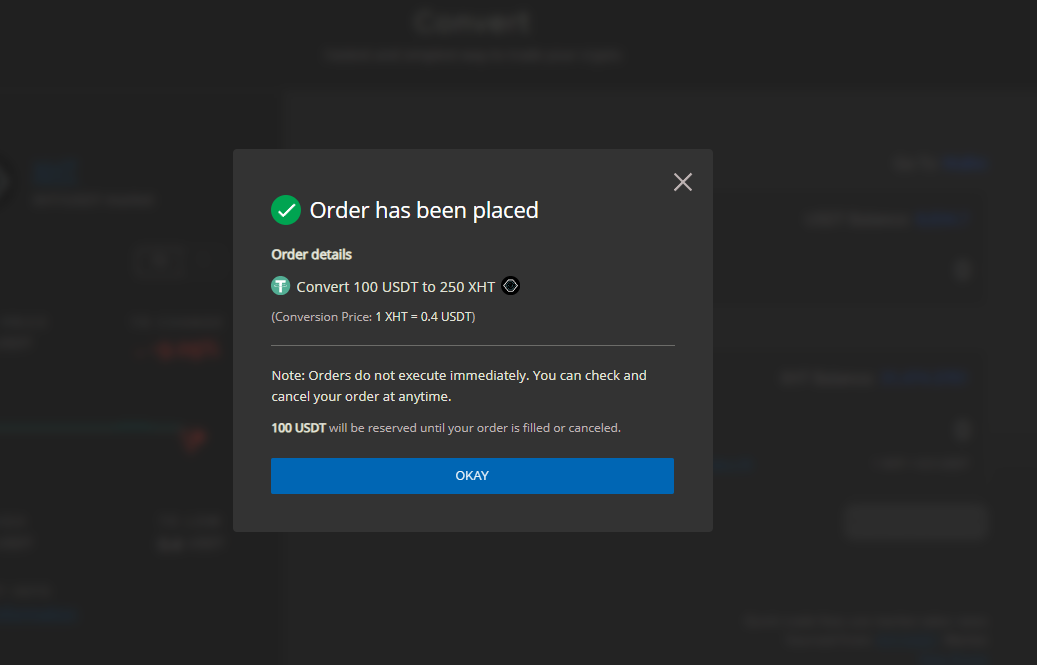
Limit order successfully placed on the Quick Trade Convert
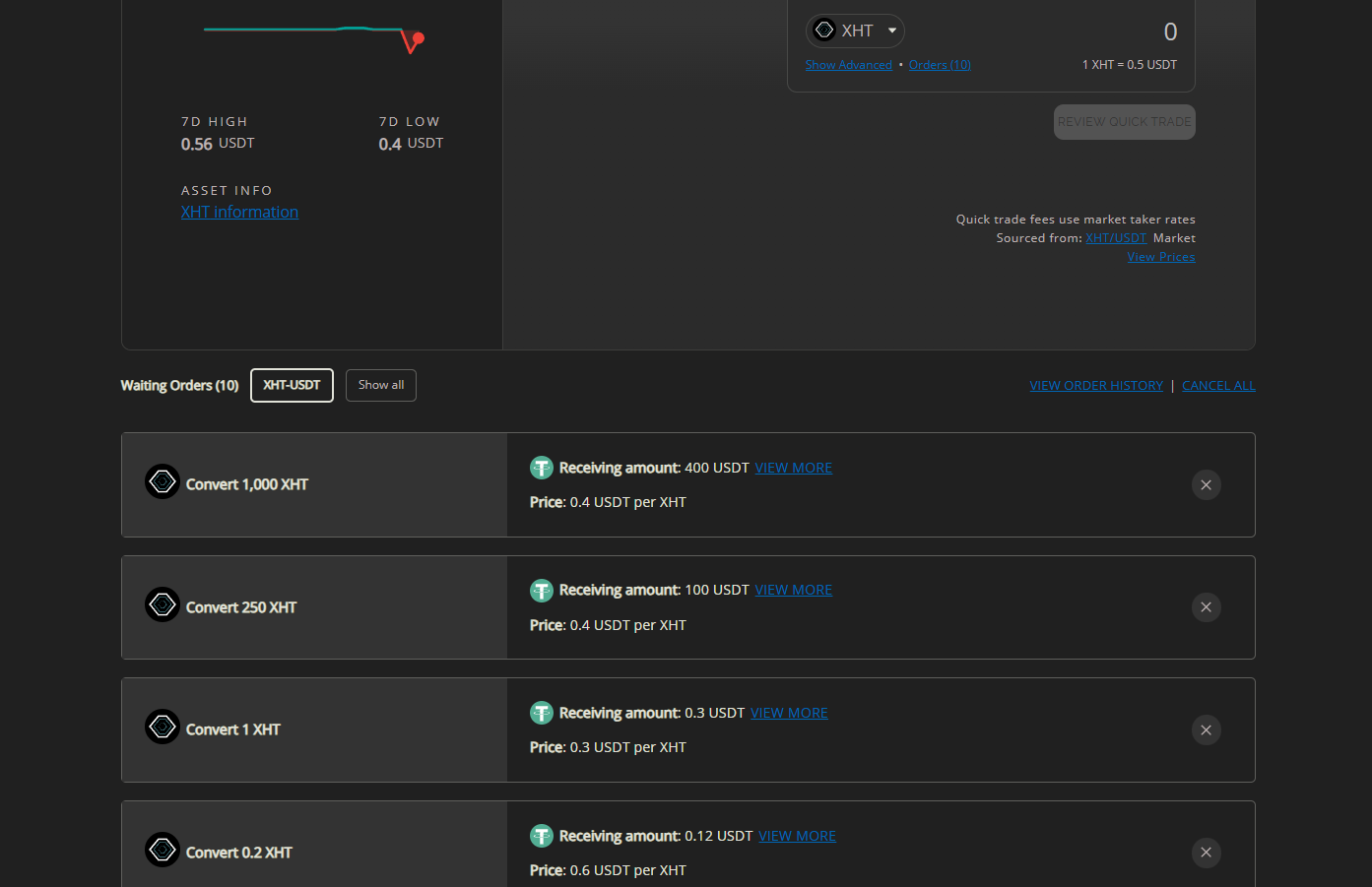
Waiting limit orders below on the Quick Trade Convert page. User can review, cancel and manage their orders here.
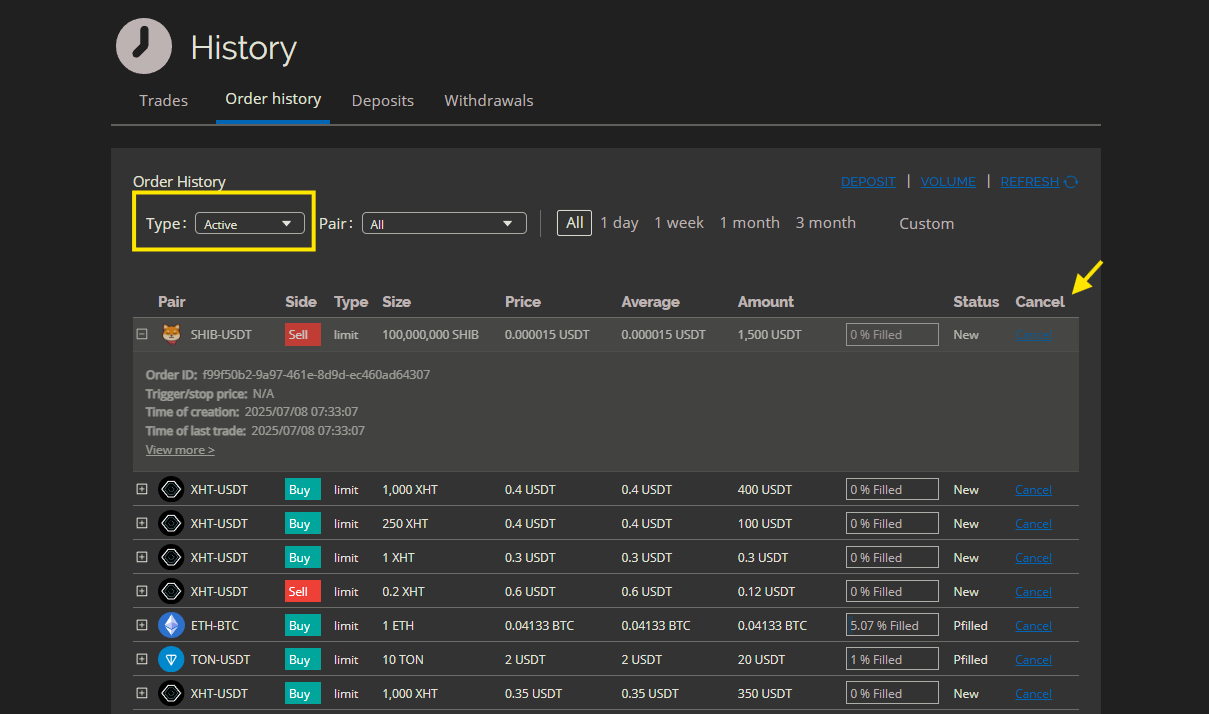
Note: Quick Trade Convert limit orders, as well as Pro Trade limit orders can be reviewed on the History Orders page under the active orders filter
It combines the best of both worlds: an easy front-end with more professional order behavior under the hood.
Admin-Enforced OTP for Withdrawals
Security takes another step forward in v2.17 Muscat.
Admins can now force OTP (2FA) on withdrawals:
OTP (also known as a one-time password) can be made mandatory for all users when they attempt to withdraw funds.
This adds an additional layer of protection against account compromise and unauthorized withdrawals.
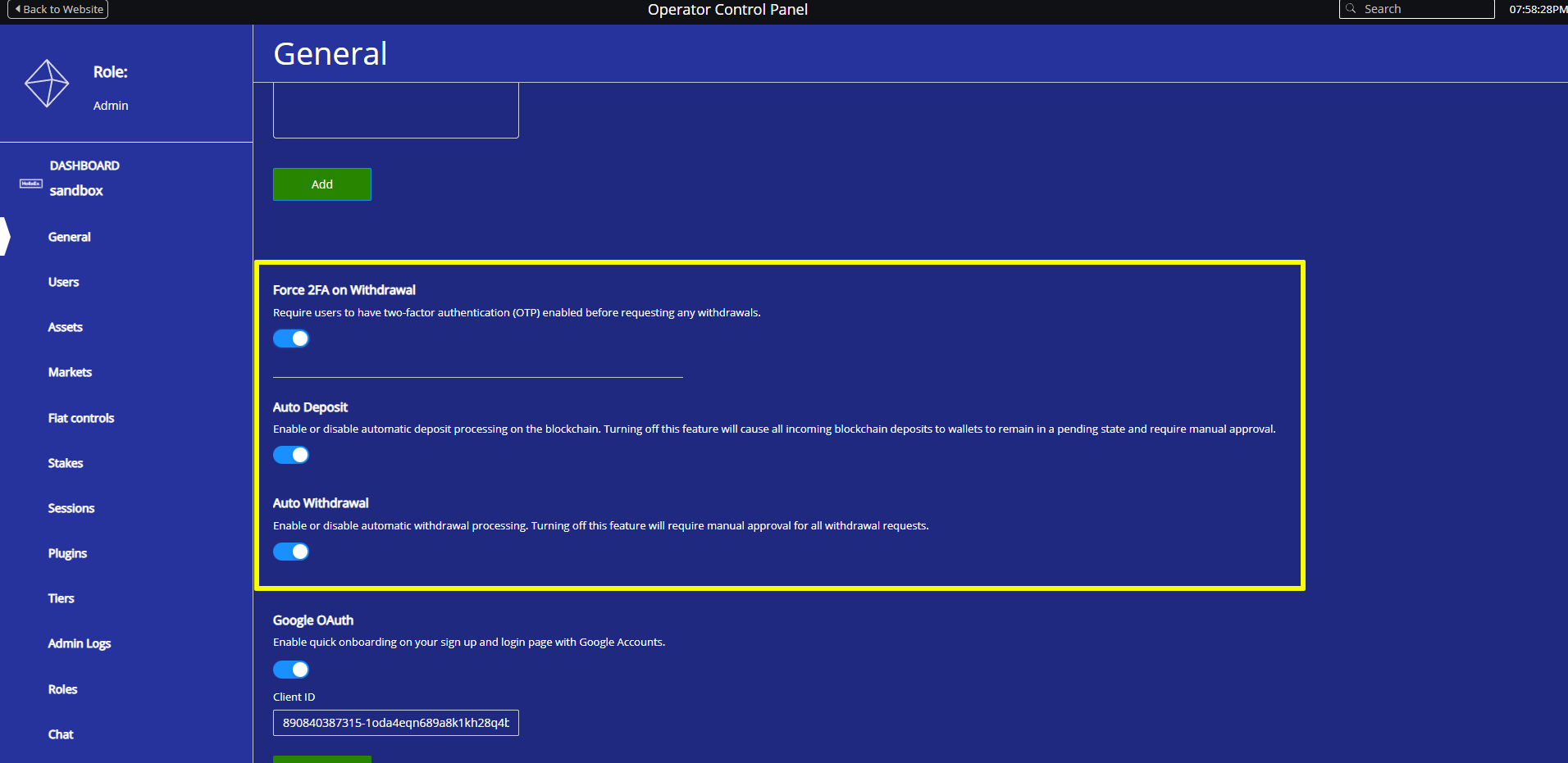
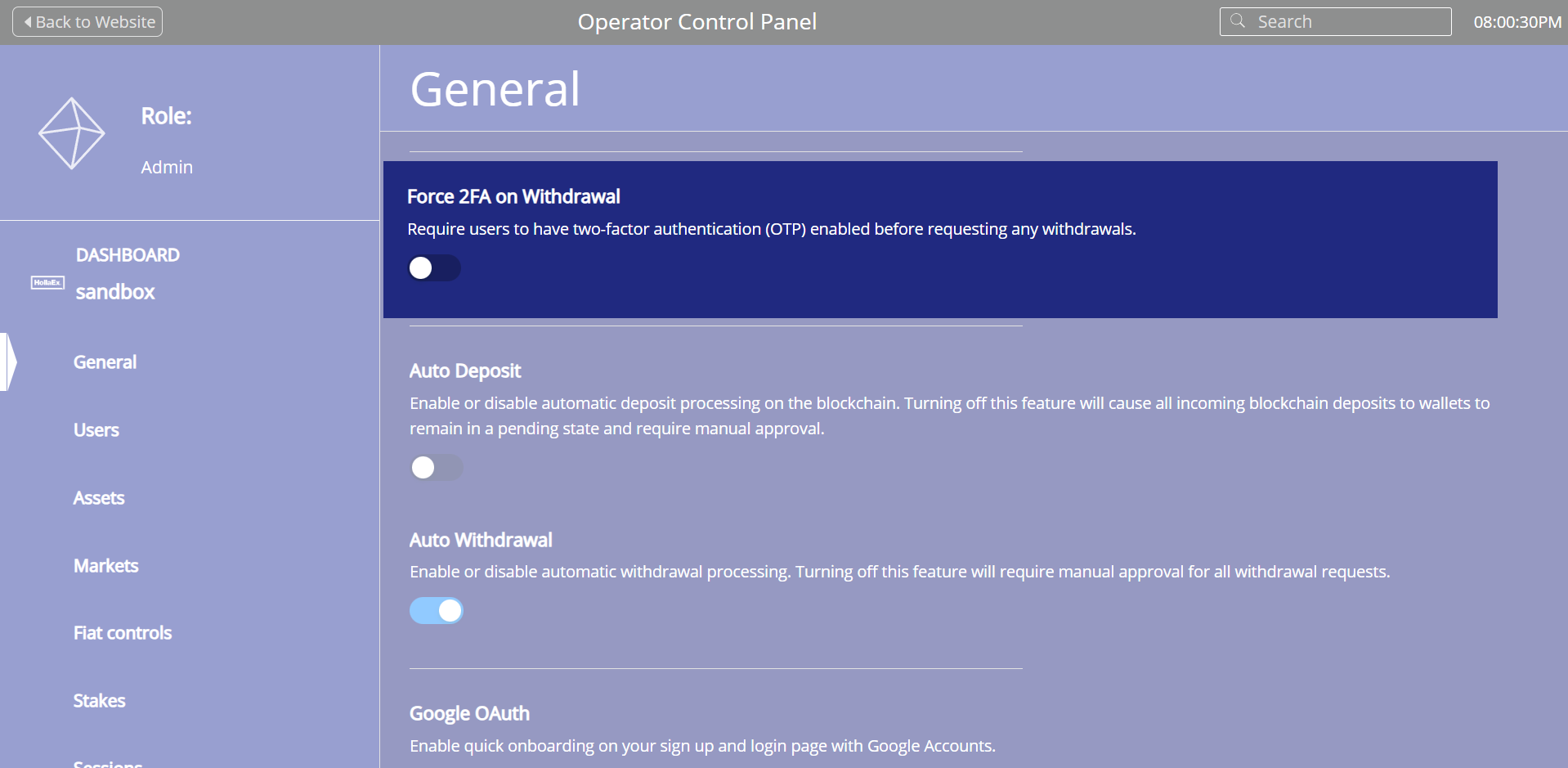
Force users to use 2FA for withdrawals new toggle switch in v2.17 for admins
For operators, this is a powerful, one-switch control: you can raise the default security standard across the entire exchange with a single configuration.
Auto-Sync Permissions and Configs for Admin Roles
Behind the scenes, Muscat makes the initialization of admin roles more robust.
During startup and upgrades, the system now automatically syncs permissions, configs, and related secrets to the latest schema. This avoids a long trail of one-off migrations and reduces the manual clean-up usually needed when new features are introduced.
For operators, this means fewer edge cases caused by outdated role definitions and a smoother upgrade path as the exchange grows over time.
Real-Time Price Streaming
v2.17 introduces the option for real-time price streaming on key pages, such as the main price page.
With streaming enabled:
Prices can now be streamed live, so users no longer have to wait for entire components to refresh.
As price changes happen, components update in real time, improving the trading experience and reducing latency between market moves and what users see.
This is especially useful for:
Users monitoring markets directly on your exchange.
Operators who want their public-facing price pages to feel more dynamic and modern.
Reducing manual refreshes by the user.
You decide where streaming makes sense, and Muscat does the heavy lifting in the background.
Auto Deposit/Withdrawal and Manual Review Options for Admins
Deposit and withdrawal handling is now much more flexible and much easier to control.
With Muscat, admins can:
Decide whether certain deposits or withdrawals should be auto-cleared or held for manual review.
Let users see pending deposits or withdrawals while the admin confirms the transaction.
The flow is designed from the start with plugin expansion in mind:
Automatically clear small deposits/withdrawals while flagging larger ones.
Integrate with blockchain analysis tools or other risk engines to halt suspicious transactions for manual review.
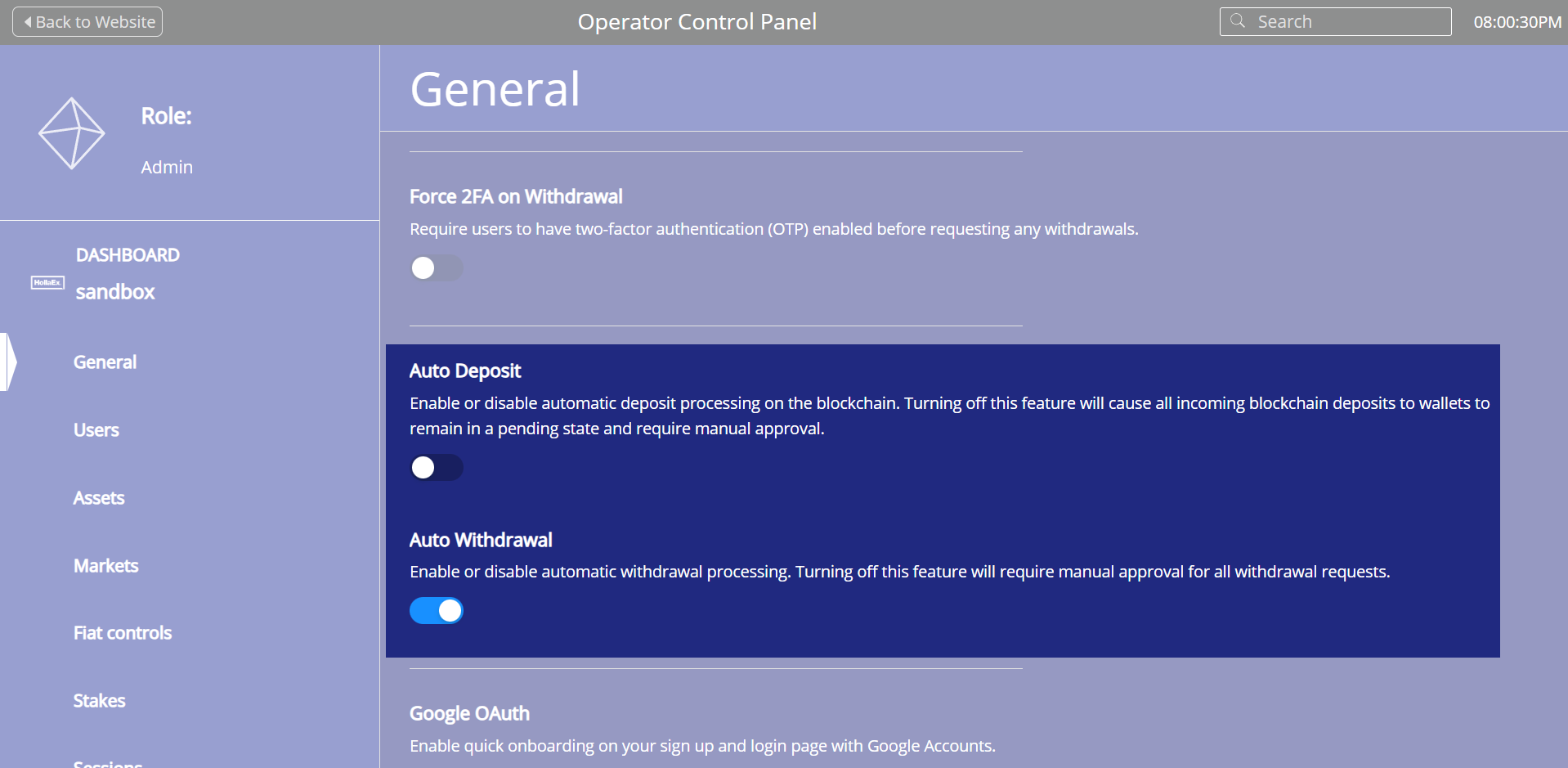
Toggle for auto deposit and withdrawal options now available to admin in v2.17 that allows for greater control over what comes in and out of the platform
For example, if an exchange operator wants all deposits under $1,000 to be handled automatically, while anything above $1,000 requires a manual review, this can be implemented via a simple plugin.
Plugin code snippet example for clearing $1,000 worth deposits:
Going further, the admin can integrate a third-party blockchain analysis tool that labels certain deposits and withdrawals as suspicious and automatically routes them into the manual review queue before they are sent from the exchange onto the blockchain.
Combined, this gives operators a much more granular layer of risk control over cash flows, without having to build a custom back-office.
Batch Coin / Asset Addition for Admins
Now that HollaEx® has added over 200+ new asset, it can be tedious to add each one-by-one. Muscat makes this far less tedious.
With v2.17:
Admins can add multiple coins/assets in a single action from the Operator Controls.
This significantly speeds up onboarding new markets, especially for operators who list many assets or run token launch programs.
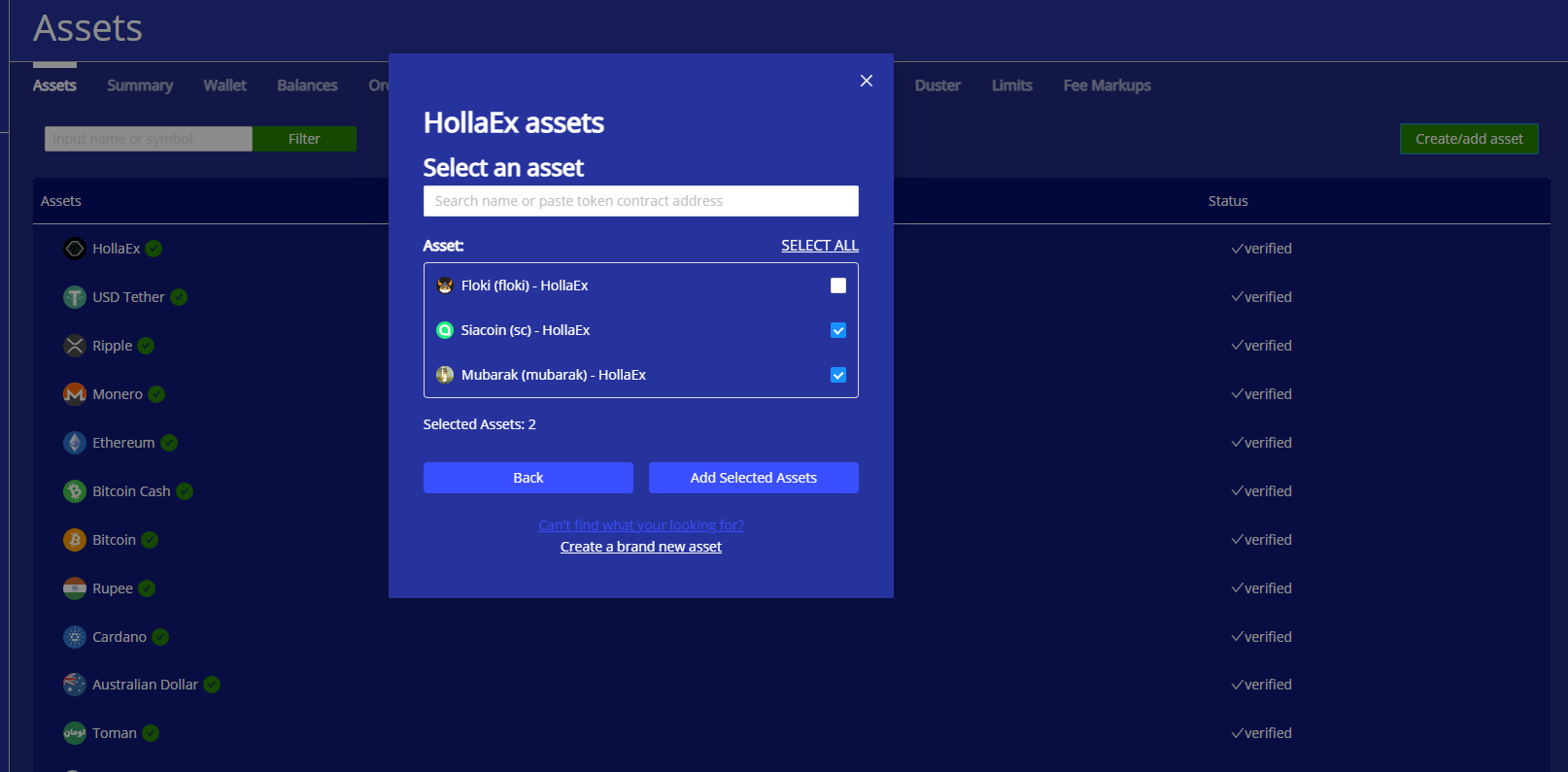
Add multiple assets at once via Operator Controls by simply checking which asset you'd like to add in the list.
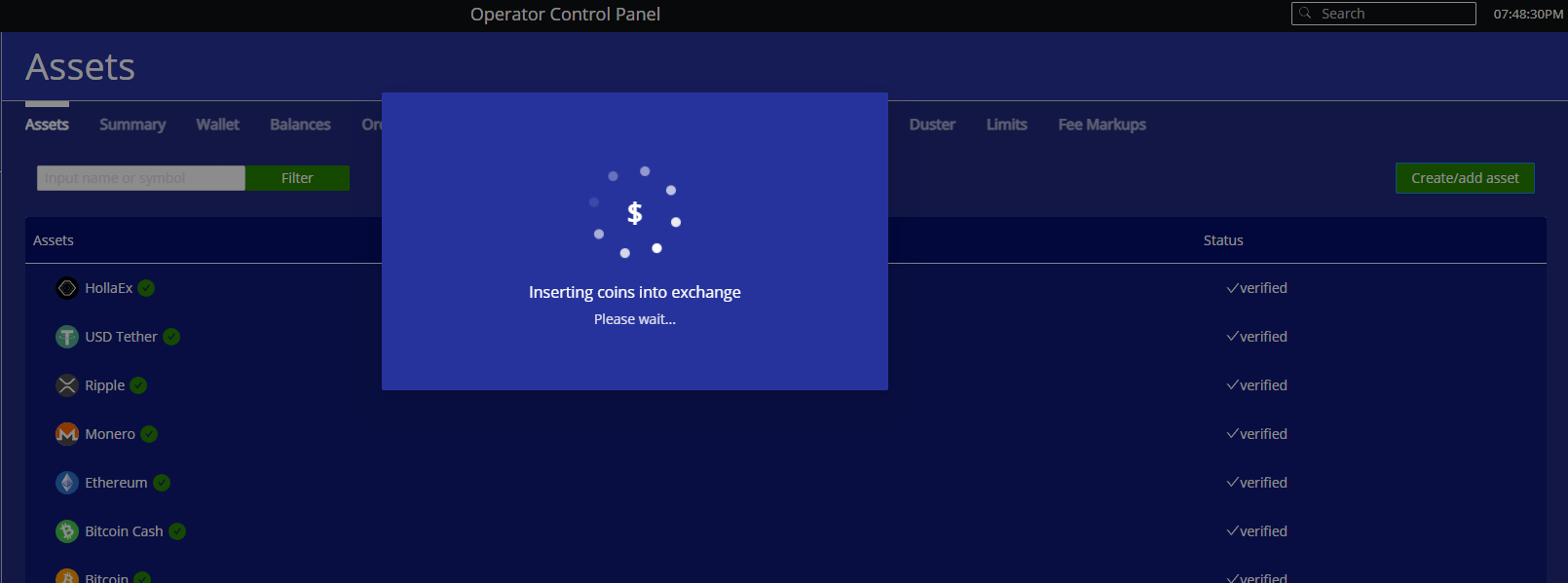
When adding multiple coins the process may take about ~1 minute
Whether you’re expanding into new ecosystems or onboarding partner tokens, batch addition keeps your listing operations fast and scalable.
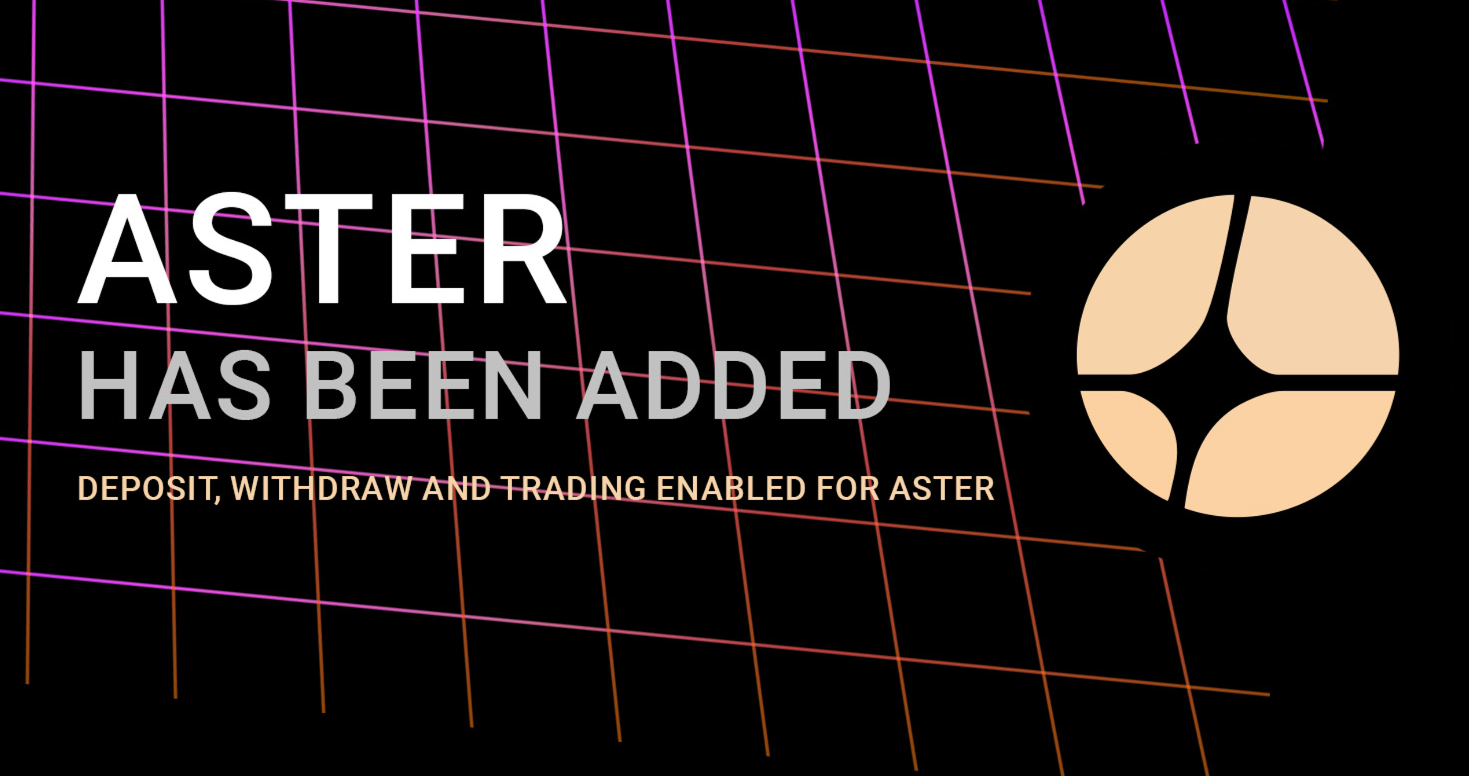
HollaEx® banner from Twitter X for Aster listing announcement
Update Your Exchange to v2.17
To the new Muscat release 🍇 santé.
Unlock the power of v2.17 by logging into the HollaEx® dashboard at dash.hollaex.com and upgrading your exchange on the hosting page.
Once updated, you’ll immediately have access to sub accounts, shared accounts, advanced OTC pricing, improved fee reporting, stronger security controls, and more.
Why White-Label Software?
When it comes to blockchain-based financial infrastructure, experience matters. This is where HollaEx® excels. With nearly a decade of carefully built and refined crypto software, HollaEx® stands out as one of the few providers dedicated solely to powering crypto exchanges.
More than a white-label, our software is the ultimate crypto API, designed for a global business market. Create new customer offerings and unlock new revenue streams with our original crypto exchange toolkit, HollaEx®.
Wallet admin view example screenshot show the wide range of HollaeEx's blockchains network support and various altcoins.
The Bullet Points
Integration-ready: Powerful APIs and multiple integrations to connect payments, wallets, and liquidity providers.
Cross-platform: Web, mobile, and desktop apps ready to launch.
Full control: Branded trading, OTC desk, and digital asset services.
Flexible deployment: Run on your own servers or on the HollaEx® secure exchange cloud.
Easy launch: Works seamlessly with the prepackaged HollaEx Kit on AWS, DigitalOcean, and OVH.
Battle-tested: 140+ releases, hardened through years of development in public.
Not convinced? Speak with an exchange sales agent and get a personal demo.






.png)